Resume a saved online passport application
the previous article, "I Tried Applying for a Passport Online | My Number Portal Experience Part 1," I introduced the preparation steps for applying for a passport online using the My Number Portal. This time, I will continue from there—summarizing my experience from actually completing the application to finally passing the Pond5 identity verification screening.
I resumed the application process using my saved data, and the first thing I did was upload my "photograph" and "handwritten signature." It's important to note that therequired image size for the photograph in the online passport application is "600 pixels wide x 730 pixels high.
I have experience in DTP in the past, so I was able to resize the image in Photoshop without any problems, but I think it would be a difficult task for the average user.
I took the photo of my face with my smartphone. I made sure the background was as plain as possible, and took care to avoid shadows or everyday objects being visible. Using a white wall at home as a background is sufficient, butyou ultimately need to edit the image to fit the specified size, this is probably the point where people get stuck most often when applying online.
Next, I took a photo of my signature. I signed with a black pen on a piece of white paper and uploaded the photo. This completed the necessary data for the online application, and I was able to complete the application smoothly.
"Failure stories" unique to online applications
Applying online was very convenient, but I also made a rather amusing mistake. I received a notification from My Number Portal saying that the application had been processed, but I mistook it for a notification that my passport had been processed. I eagerly went to the passport center, only to be told that it hadn't been issued yet. As a result, I ended up going about 10 days early.
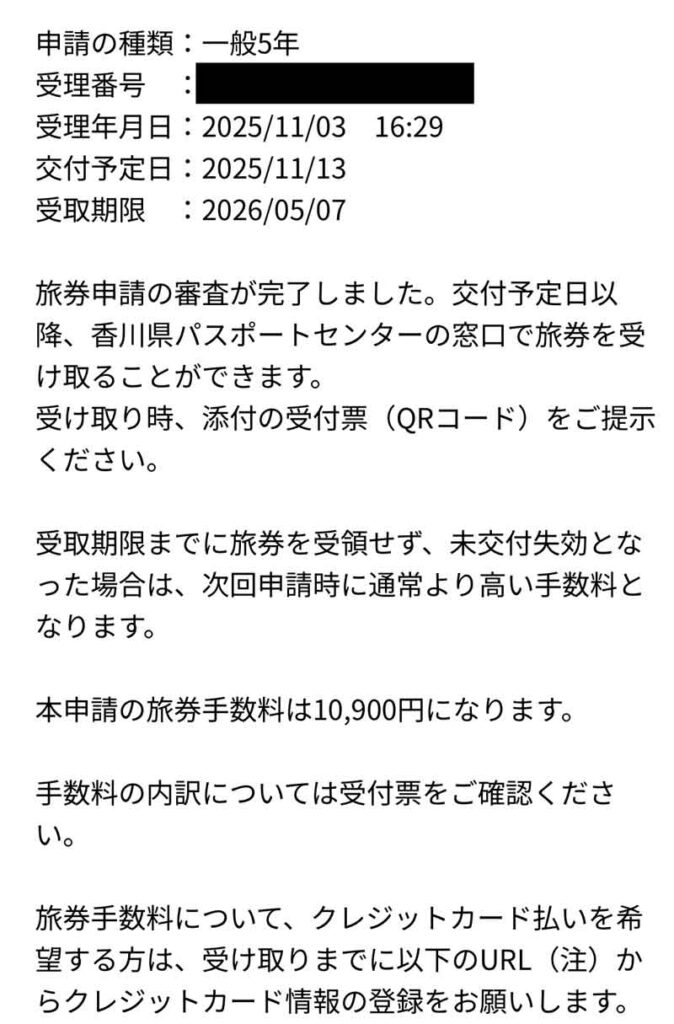
Even though I applied online, it took about 10 days for the passport to be issued, just like applying in person. This was a bit disappointing.
However, there are advantages to applying online.
You may be thinking, "If it takes 10 days, wouldn't it be the same to apply in person?", but there are definite advantages to applying online.
- Save money on passport photos: Photos taken with your smartphone are fine. A plain background is sufficient.
- The process can be completed at home: There is no need to go to a passport center, and you can apply at your convenience.
- They accept credit card payments: This was convenient for me since I don't carry cash.
In particular, not having to spend money on photography was a major benefit. Recent smartphone cameras have high image quality, so as long as you meet the requirements, your application will be approved.
Successfully passed Pond5's identity verification screening
After receiving my passport, the next step was to reapply to Pond5. To sell audio files, I needed to provide proof of identity, so I took a photo of the photo page of my newly acquired passport and uploaded it to the Pond5 review form.
About 3-4 days after applying, I received a notification that my account had been approved. This meant that my Pond5 seller registration was finally complete. Looking back, it took about a month from applying for my passport online to completing Pond5's review.
Summary: It takes time, but it's definitely evolving
When I applied for a passport online for the first time, I was surprised at how convenient administrative procedures have become. Of course, there were some hassles and mistakes, but it is much more modern than the traditional method, as it saves on photo costs and can be completed at home.
And above all, this passport marked the first step in my next challenge: selling my sounds on Pond5. In my next post, I'll talk about my experience uploading my sound material and having it pass the screening process.
comment